8 Best Receipt Scanners for Personal Expenses in 2026
Explore the top receipt scanners that excel in speed, software integration, and portability for personal expense management.
As an Amazon Associate we earn from qualifying purchases. Prices and availability change often, so check the current price on Amazon before you buy.
This guide highlights the best receipt scanners designed to streamline personal expense management. Each option varies in features like speed and software integration to suit different user needs.
Frequent users requiring fast and efficient scanning should consider the Epson RapidReceipt RR-620W, making it the top choice. Budget-conscious users seeking portability may find the Epson RapidReceipt RR-60 to be the ideal selection.
Keep in mind the importance of software integration and scanning speed as you explore these options, especially if you plan to utilize tools like QuickBooks.
We compared 8 options currently sold on Amazon and ranked them on how well each fits this use, its published specs and features, price, and customer ratings, giving more weight to ratings backed by many reviews. We haven’t tested these products hands-on; the picks are based on that data.
- Epson RapidReceipt RR-620W Wireless & USB Scanner
- Canon imageFORMULA R40 Office Document Scanner Receipt Edition
- Epson RapidReceipt RR-60 Compact Mobile Document Scanner
- NeatReceipts Professional Mobile Receipt and Document Scanner and Software Combination Version 3.0
- IRIScan Executive 4 Pro Portable Duplex Scanner
- Epson RapidReceipt RR-400W Wireless Compact Desktop
- Epson RapidReceipt RR-600W Wireless Desktop Scanner
- Epson RapidReceipt RR-600W Wireless Desktop Color Two-Sided Receipt Scanner
Quick comparison
1. Epson RapidReceipt RR-620W Wireless & USB Scanner

During tax season, tracking receipts can feel overwhelming. This scanner quickly processes large batches, so users can focus on managing expenses effectively. Professionals who need to organize documents efficiently will find this model advantageous.
Pros:
- Scans up to 45 pages per minute for quick processing
- 100-sheet auto document feeder reduces manual handling
- AI-ready technology extracts data for easy financial integration
- 4.3" color touchscreen simplifies direct scanning to email or cloud
Cons:
- Advanced features may exceed needs of casual users
- Larger footprint may require more desk space
The scanning speed of up to 45 pages per minute allows users to efficiently process large batches of receipts and documents. This is crucial for professionals managing numerous transactions regularly.
The 100-sheet auto document feeder minimizes the need for constant monitoring. Users can scan multiple documents without interruptions, making it suitable for busy environments.
AI-ready technology enhances data extraction by converting scanned information into smart digital data. This feature is particularly useful for those integrating their financial documentation with software like QuickBooks.
A 4.3-inch color touchscreen provides an intuitive interface for navigating scanning options. It allows users to scan directly to email or cloud storage without needing a computer, adding flexibility to the scanning process.
2. Canon imageFORMULA R40 Office Document Scanner Receipt Edition
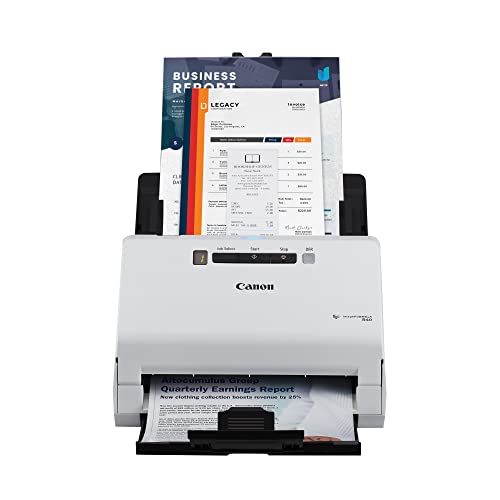
This model features software for direct uploads to QuickBooks Online, making it suitable for users focused on efficient financial management. Its ability to quickly scan batches of receipts helps streamline the documentation process.
Pros:
- 40 pages per minute scanning speed: process large stacks of receipts quickly
- Software extracts key data: saves time on manual entry and organization
- Single-button operation: intuitive use increases productivity
- Versatile document scanning: handles various sizes and types efficiently
- Includes CaptureOnTouch: easy uploads to QuickBooks Online
Cons:
- Limited wireless capabilities compared to some models
- Scanning speed is slower than Epson RapidReceipt RR-620W
The R40's direct upload feature to QuickBooks Online distinguishes it from the Epson RapidReceipt RR-620W, which has a faster scanning speed of up to 45 pages per minute. Users focused on financial management might prioritize the R40 for its software capabilities over the higher speed of the Epson.
While the RR-620W offers advanced AI technology for intelligent data extraction, the Canon R40 simplifies the scanning process with its single-button operation. This feature may appeal to users who need a straightforward solution for processing receipts and invoices without complex setup.
The R40's ability to scan a variety of document types and sizes makes it versatile for home or office use. However, buyers should note its limited wireless capabilities, which may impact mobility compared to other models that offer more advanced connectivity options.
3. Epson RapidReceipt RR-60 Compact Mobile Document Scanner
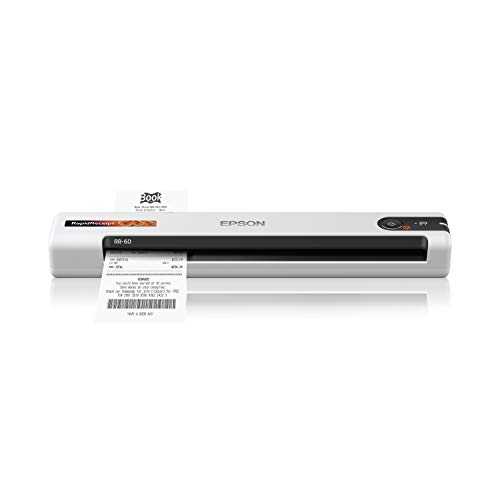
You might need a scanner that fits easily into a bag for on-the-go use. The lightweight design and compact size of the RR-60 make it ideal for personal expense management without taking up much space.
Pros:
- Scans up to 10 pages per minute for quick processing
- Weighs under 10 oz, enhancing portability
- HyperClear Technology improves scan quality for better readability
- Supports scanning to cloud storage like Google Drive
- Automatically categorizes files, saving time on organization
Cons:
- Slower than other models designed for high-volume scanning
- Limited to USB power, which may restrict usage options
The Epson RapidReceipt RR-60 addresses the needs of users who require a portable, budget-friendly solution for scanning receipts and documents. Its lightweight design facilitates easy transport, while fast scanning at 10 pages per minute helps manage basic document needs efficiently.
Features like HyperClear Technology ensure high-quality scans with auto cropping and background removal. The ability to export to financial software like QuickBooks enhances its functionality, allowing users to integrate organized data directly into their financial applications.
4. NeatReceipts Professional Mobile Receipt and Document Scanner and Software Combination Version 3.0

Individuals who manage personal expenses will find this scanner useful. It allows users to scan receipts and documents easily without needing a bulky setup.
Pros:
- Portable design: easily fits in a bag or briefcase
- Automatic data extraction: saves time during financial organization
- IRS-accepted scans: simplifies tax preparation tasks
- USB-powered: eliminates the need for an AC adapter
- Compact dimensions: easy to store when not in use
Cons:
- Limited to scanning speed: may be slower than some competitors
- No wireless capability: requires a direct connection to operate
This scanner excels in portability and software integration, making it suitable for users who prioritize convenience and ease of data management.
While it may not match the scanning speeds of other models like the Epson RapidReceipt RR-620W, its design and software capabilities cater well to personal expense tracking.
5. IRIScan Executive 4 Pro Portable Duplex Scanner

Those who prefer a compact scanner for receipts and documents benefit from portability. The IRIScan Executive 4 Pro scans both color and black and white documents at up to 8 pages per minute, making it suitable for quick scans on the go.
Pros:
- 8 pages per minute duplex scanning: efficient color and black and white scans
- Powered by USB cable: usable without an outlet
- Scans to Word, PDF, and Excel: versatile file format options
- Includes Readiris OCR software: easily convert scanned documents into editable text
- Business card scanning direct to Outlook: simplifies contact management
Cons:
- Only compatible with Windows: limits use for Mac users
- Slower than other models like Epson RapidReceipt RR-620W
Compared to more advanced scanners like the Epson RapidReceipt RR-620W, which scans up to 45 pages per minute, the IRIScan Executive 4 Pro offers portability and a compact design at the expense of speed. Users who prioritize lightweight options for travel will find this scanner beneficial despite its slower pace.
For Windows users needing quick scans of receipts and documents in various formats, the IRIScan’s ability to scan to Word, PDF, and Excel can streamline workflows effectively. However, those relying on Mac systems must look elsewhere due to compatibility limitations.
6. Epson RapidReceipt RR-400W Wireless Compact Desktop
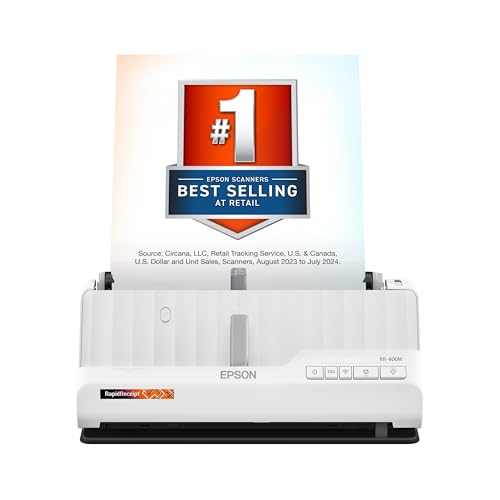
Employees working from home often face space constraints. This scanner's compact design saves desk space, making it suitable for hybrid work environments.
Pros:
- Wireless scanning directly to cloud or devices
- 20-page document feeder handles various sizes with protection
- Fast double-sided scanning at up to 30 pages per minute
- AI PRO technology converts receipts into smart digital data
- Create searchable and editable PDFs for easy organization
Cons:
- Covers basic scanning needs but lacks advanced features of higher-end models
- Scanning speed is slower compared to some competitors
The RR-400W addresses the challenge of managing receipts and documents in a digital format. It quickly scans both sides of documents, allowing users to convert physical records into organized digital data without excessive time or effort.
Its compact design is advantageous for remote workers with limited space on their desks. The fast 30 pages per minute scanning speed helps manage multiple documents efficiently, although some higher-end models may offer faster speeds.
While this model excels in basic functions, those needing advanced capabilities may find it lacks compared to others like the RR-620W, which offers higher scanning speeds and additional features.
7. Epson RapidReceipt RR-600W Wireless Desktop Scanner

Individuals who manage large volumes of receipts and invoices benefit from streamlined scanning. This model suits those looking to integrate scanned data into financial software effortlessly.
Pros:
- 35 pages per minute scanning speed: quickly digitizes stacks of documents
- 100-page document feeder: handles various document sizes with ease
- Wireless scanning: scan directly to cloud or mobile devices
- 4.3-inch color touchscreen: simplifies PC-free scanning to email or storage
- AI-powered data extraction: automates categorization for financial software
Cons:
- Requires external software for full PDF editing capabilities
- Larger footprint may not fit on all desks
The scanning speed of 35 pages per minute allows users to quickly digitize large batches of invoices and receipts, reducing time spent on data entry. This is particularly beneficial for small business owners or freelancers managing extensive paperwork.
With the 100-page document feeder, users can load a variety of documents at once without interruption. This feature is advantageous for those who need to process different-sized receipts and invoices in a single session, enhancing productivity.
8. Epson RapidReceipt RR-600W Wireless Desktop Color Two-Sided Receipt Scanner

People managing numerous receipts or invoices will benefit from the RR-600W's capabilities. This scanner easily converts physical documents into organized digital data.
Pros:
- ScanSmart AI PRO technology extracts data into smart digital formats
- Export scanned data directly to financial software like QuickBooks
- 100-page document feeder handles various document sizes efficiently
- 4.3-inch color touchscreen allows PC-free scanning options
- Duplex scanning captures both sides of documents in one pass
- Wireless scanning connects directly to cloud or devices
Cons:
- Scanning speed is not the fastest in its category
- Requires a stable internet connection for wireless features
Compared to the Epson RapidReceipt RR-620W, which scans up to 45 pages per minute, the RR-600W is slightly slower. However, it provides a great balance of features for those who prioritize data management over speed.
The RR-620W might be preferable for users needing faster scanning, while the RR-600W suits those who value extensive software integration and a robust document feeder.
Avoiding Common Mistakes When Choosing a Receipt Scanner
Overlooking Scanning Speed
Scanning speed affects how quickly users can process receipts. The Epson RapidReceipt RR-620W reaches up to 45 pages per minute, making it suitable for frequent users who need efficiency.
Ignoring Software Compatibility
Integration with software like QuickBooks can streamline expense management. The Canon imageFORMULA R40 is designed for seamless QuickBooks integration, appealing to users who prioritize this feature.
Neglecting Portability
Portability is crucial for users on the go. The Epson RapidReceipt RR-60 weighs under 10 oz, making it a great budget-friendly option for those needing a mobile solution.
Frequently Asked Questions
What is the scanning speed of the Epson RapidReceipt RR-620W?
The scanning speed is up to 45 pages per minute, allowing frequent users to scan documents quickly.
Which scanner is best for QuickBooks integration?
The Canon imageFORMULA R40 is ideal for seamless QuickBooks integration, supporting efficient expense tracking.
How portable is the Epson RapidReceipt RR-60?
The Epson RapidReceipt RR-60 weighs under 10 oz, making it a very portable option for users needing to scan receipts on the go.
Does the NeatReceipts scanner support data export?
Yes, it exports to Excel, QuickBooks, and TaxCut, making it versatile for organizing expenses.
Is duplex scanning available in the IRIScan Executive 4 Pro?
Yes, it supports duplex scanning, enabling users to scan both sides of a document simultaneously.
What size documents can the Epson RapidReceipt RR-60 support?
It supports documents up to 8.5" x 72", accommodating a variety of receipt sizes.
Which Receipt Scanner Should You Choose?
The common mistake to avoid is overlooking scanning speed, which can affect efficiency. The Epson RapidReceipt RR-620W excels in speed, making it the best overall choice for frequent users. For those focused on QuickBooks integration, the Canon imageFORMULA R40 is recommended. Budget-conscious users seeking portability should consider the Epson RapidReceipt RR-60. Overall, the Epson RapidReceipt RR-620W is the top pick for fast and efficient scanning.