8 Best Dual Monitor Stands for Home Offices in 2026
Explore the top dual monitor stands for home offices, designed for various monitor sizes, weights, and adjustable options for better workspace efficiency.
As an Amazon Associate we earn from qualifying purchases. Prices and availability change often, so check the current price on Amazon before you buy.
Many buyers overlook how crucial compatibility and adjustability are when selecting a dual monitor stand. The right stand can maximize desk space and improve ergonomics by allowing users to position their screens at optimal heights and angles.
Adjustable stands provide the flexibility needed for different monitor sizes and weights, ensuring that setups can easily adapt to changing needs. The VIVO Dual Monitor Stand, Fully Adjustable Arms excels in broad monitor compatibility, making it a top choice for users seeking versatility.
For those focused on budget without sacrificing flexibility, the MOUNTUP Dual Monitor Stand fits up to 32 inch offers a practical solution. Keep these factors in mind as you explore options for a more efficient workspace.
We compared 8 options currently sold on Amazon and ranked them on how well each fits this use, its published specs and features, price, and customer ratings, giving more weight to ratings backed by many reviews. We haven’t tested these products hands-on; the picks are based on that data.
- VIVO Dual Monitor Stand, Fully Adjustable Arms
- HUANUO FlowLift Dual Monitor Stand
- ErGear Dual Monitor Stand, Heavy Duty Adjustable Monitor Desk Mount
- MOUNTUP Dual Monitor Stand fits up to 32 inch
- EVEO Premium Dual Monitor Mount
- Vari Dual Monitor Arm – VESA Monitor Mount
- monTEK Dual Monitor Mount Monitor Arms
- MOUNTUP Dual Monitor Stand for Desk
Quick comparison
| Product | Best for | ||
|---|---|---|---|
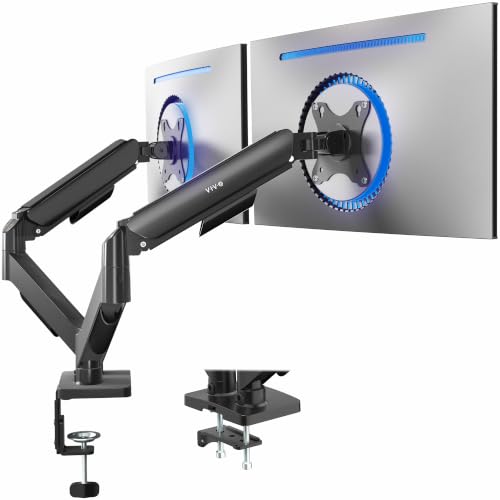 |
Best OverallVIVO Dual Monitor Stand, Fully Adjustable Arms | Users needing broad monitor compatibility | Check Price on Amazon |
 |
Best AdjustableHUANUO FlowLift Dual Monitor Stand | Users needing full motion adjustment and stability | Check Price on Amazon |
 |
Best VersatilityErGear Dual Monitor Stand, Heavy Duty Adjustable Monitor Desk Mount | Users needing versatile screen positioning | Check Price on Amazon |
 |
MOUNTUP Dual Monitor Stand fits up to 32 inch | Budget-conscious users wanting flexibility | Check Price on Amazon |
 |
EVEO Premium Dual Monitor Mount | Home offices with limited desk space | Check Price on Amazon |
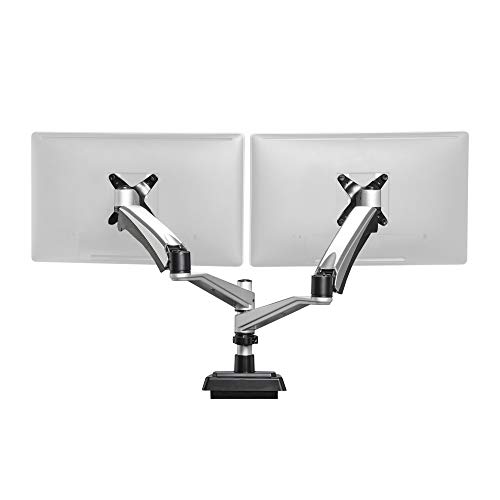 |
Vari Dual Monitor Arm – VESA Monitor Mount | Users wanting maximum adjustability for dual screens | Check Price on Amazon |
 |
monTEK Dual Monitor Mount Monitor Arms | Users needing strong support for larger screens | Check Price on Amazon |
 |
MOUNTUP Dual Monitor Stand for Desk | Users with multiple monitor setups needing flexibility | Check Price on Amazon |
1. VIVO Dual Monitor Stand, Fully Adjustable Arms
Those with multiple monitors often struggle to find a stand that fits various screen sizes. This stand supports screens from 17 to 32 inches and weighing up to 19.8 lbs each, addressing a common issue in home office setups.
Pros:
- Supports 17 to 32-inch screens: Fits a wide range of monitor sizes
- Mechanical spring adjustment: Allows for quick and precise height placement
- 180° swivel and 360° rotation: Offers customizable viewing angles
- Easy assembly: All necessary hardware and instructions included
- C-clamp mount: Frees up desk space by elevating monitors
Cons:
- Arms extend past desk edge, which may limit desk placement
- Max weight per monitor is 19.8 lbs, limiting heavier setups
The VIVO Dual Monitor Stand sets itself apart from the HUANUO FlowLift by accommodating a broader range of monitor sizes. While both stands support a maximum weight of 19.8 lbs, the VIVO allows for greater flexibility in monitor selection, making it suitable for varied setups.
Its mechanical spring adjustment simplifies monitor placement, requiring no tools. This feature contrasts with other products, such as the ErGear Dual Monitor Stand, which may involve more complex installation and adjustments.
For users with limited desk space, the C-clamp mount is a significant advantage. It elevates monitors off the desk surface, unlike stands that require more extensive base space. However, the design does mean that the arms extend past the desk edge, which could be a drawback for some setups.
2. HUANUO FlowLift Dual Monitor Stand
People who switch between tasks on dual monitors benefit from the FlowLift's full-motion capabilities. Adjusting screen angles easily can reduce strain and improve focus during long hours of work or gaming.
Pros:
- Supports screens from 13 to 32 inches
- Holds up to 19.8 lbs per arm
- Full-motion adjustment for tilt, swivel, and rotation
- Dual C-clamp ensures stable mounting
- Built-in cable management keeps cords organized
Cons:
- Not suitable for plastic or glass desks
- Maximum desk thickness of 3.54 inches limits options
- Weight capacity per arm may limit larger setups
Full-motion adjustment allows users to pull screens closer or push them back with ease. This feature is beneficial for tasks like coding or watching videos, as it provides flexibility in positioning monitors according to activity.
The dual C-clamp design provides a strong and steady grasp on desks, preventing wobbling during use. This ensures that monitors remain stable, even during intense typing or gaming sessions.
Cable management integrated into the stand helps maintain a clean workspace. Organizing cords effectively can enhance productivity and create an aesthetically pleasing setup.
3. ErGear Dual Monitor Stand, Heavy Duty Adjustable Monitor Desk Mount
The ErGear Dual Monitor Stand is suited for those who require flexible monitor arrangements for optimal ergonomics. It offers extensive adjustability compared to other options like the VIVO stand, accommodating larger monitors and a wider range of desk setups.
Pros:
- Supports monitors up to 32 inches for immersive viewing
- Height, tilt, and swivel adjustments cater to ergonomic needs
- Easy installation with two setup options for versatility
- Free up desk space for improved organization
- Cable management clips keep workspace tidy
Cons:
- Maximum monitor weight of 17.6 lbs is lower than some competitors
- Best suited for wooden desks, limiting compatibility with other materials
The ErGear Dual Monitor Stand offers excellent versatility for users needing to adjust their monitor positions frequently. It supports monitors up to 32 inches, allowing for a broad range of display setups. The extensive height and tilt adjustments enhance ergonomic comfort, which is crucial for long hours of work or gaming.
Installation is straightforward with two mounting options, catering to different desk designs. However, the maximum weight capacity of 17.6 lbs per arm may limit its use with larger or heavier monitors, making buyers consider their specific monitor weights before purchasing.
4. MOUNTUP Dual Monitor Stand fits up to 32 inch
A dual monitor setup can enhance productivity, but it often requires space and a suitable mount. Those who prioritize budget and the need for adjustability will find value in this stand.
Pros:
- Supports monitors up to 32 inches weighing 4.4 to 19.8 lbs
- Full motion adjustments reduce neck and back strain
- Adjustable arms extend 19.5 inches and rise 16.9 inches
- Cable management keeps desktop clutter-free
- Two easy installation methods for versatile mounting
Cons:
- Limited maximum weight may not support heavier monitors
- Adjustable height may not suit very tall users
This stand accommodates a wide range of monitor sizes and weights, making it suitable for various setups. However, its weight capacity limits options for users with heavier displays, which may be a consideration for some.
The full motion capability allows for extensive adjustments, promoting better ergonomics. This level of flexibility is ideal for those who alternate between sitting and standing, but taller users may find the maximum height insufficient.
5. EVEO Premium Dual Monitor Mount
This dual monitor mount suits people seeking to maximize their workspace. It elevates screens, reduces clutter, and provides flexible positioning for enhanced productivity.
Pros:
- Compatible with 14"-32" screens: fits various monitor sizes
- Easy installation in 5 minutes: no professional help required
- 360° rotation and +90° to -90° swivel: adjust screens effortlessly
- Ergonomic design: promotes better posture and reduces strain
- Durable materials: built for long-lasting use
Cons:
- Requires VESA compatibility: monitors must support VESA patterns
Dual monitor setups can create clutter and strain if not properly configured. This mount elevates two screens, significantly reducing desk clutter while promoting an organized workspace.
With its compatibility for VESA 75×75 and 100×100 mm patterns, it accommodates a wide range of monitors. The quick installation process, using either a desk clamp or grommet mount, ensures users can set it up with minimal hassle.
Buyers should consider that while it enhances space and ergonomics, the need for VESA-compatible monitors may limit options for some users.
6. Vari Dual Monitor Arm – VESA Monitor Mount
Individuals needing ergonomic setups can benefit from raising their monitors. This mount allows users to position two monitors at eye level, reducing strain during long work hours.
Pros:
- Supports monitors up to 27 inches: accommodates a wide range of screens
- Raises monitors 12 inches above the desk: promotes better posture and comfort
- 360-degree rotation: allows flexible orientation for different tasks
- Quick installation: gets users back to work without delays
- 5-year warranty: assures quality and long-term usage
Cons:
- Maximum weight of 30.9 lbs limits heavier displays
- Requires desk thickness of 1.375 inches or less for installation
The Vari Dual Monitor Arm supports monitors up to 27 inches and holds a maximum weight of 30.9 lbs. This capacity accommodates most common monitors, making it suitable for both standard and larger screens.
The 360-degree rotation feature enhances usability by allowing users to adjust monitors easily for different tasks. This versatility matters for professionals who switch between various applications frequently.
7. monTEK Dual Monitor Mount Monitor Arms
When working with multiple applications, having dual monitors can boost productivity. This mount accommodates screens from 17 to 35 inches, making it suitable for various professional setups, gaming rigs, and home offices.
Pros:
- Supports monitors up to 35.27 lbs for stability
- Height adjusts from 8.8 to 20.4 inches for comfort
- Tilt, swivel, and rotation options for optimal viewing
- Compact design keeps desk space uncluttered
- Quick installation with C-clamp and grommet options
Cons:
- Requires longer bolts for some curved monitors
- Max weight capacity exceeds other mounts in the guide
Compared to the VIVO Dual Monitor Stand, which supports a maximum weight of 19.8 lbs, the monTEK mount accommodates heavier screens. This makes it a better choice for users with larger monitors or a mix of screen sizes, while the VIVO offers a more lightweight solution for smaller setups.
The HUANUO FlowLift also maxes out at 19.8 lbs, providing less stability for heavier displays. The monTEK's higher weight capacity allows for peace of mind when setting up dual monitors, especially if both screens are closer to the upper limit of compatibility.
8. MOUNTUP Dual Monitor Stand for Desk
This stand supports monitors weighing 4.4 to 17.6 lbs and measuring 17 to 32 inches diagonally. It suits professionals who value flexibility and ergonomic comfort while working or gaming.
Pros:
- Fits monitors 17-32 inches, accommodating a range of screen sizes
- 135° tilt, 180° swivel, and 360° rotation for optimal viewing angles
- Holds 4.4-17.6 lbs securely, catering to various monitor weights
- Easy setup with C-clamp or grommet base for different desk types
- Cable management system keeps wires organized and desk clutter-free
Cons:
- Limited weight capacity compared to some alternatives
- Requires proper tension adjustment based on monitor weight
This stand is built for users who need customizable positioning for their monitors to reduce neck and back strain. The full motion features, including a wide tilt, swivel, and rotation, allow users to find their ideal viewing angle without hassle. Its sturdy construction ensures that monitors stay stable, while the cable management system helps maintain a tidy workspace, making it a practical choice for productivity-focused environments.
What Separates a Good Dual Monitor Stand from a Great One
Monitor Compatibility
Check the range of screen sizes and weights supported. The VIVO Dual Monitor Stand accommodates monitors from 17 to 32 inches and weights up to 19.8 lbs, making it suitable for a wide array of setups.
Adjustability Features
Evaluate the adjustability options like tilt, swivel, and rotation. The HUANUO FlowLift offers full motion adjustment, with a tilt range of +85° to -50°, allowing for precise positioning.
Installation Method
Consider how the stand mounts to your desk. The EVEO Premium Dual Monitor Mount provides both desk clamp and grommet mount options, making it adaptable to different desk configurations.
Weight Capacity
Review the maximum weight each arm can support. The monTEK Dual Monitor Mount can handle up to 35.27 lbs per arm, suitable for larger, heavier monitors.
Height Adjustment
Height adjustment can enhance ergonomics. The ErGear Dual Monitor Stand allows for 16 inches of height adjustment, helping to achieve a comfortable viewing position.
Arm Extension
Arm extension provides flexibility in positioning. The MOUNTUP Dual Monitor Stand features an arm extension of 19.5 inches, enabling a customized setup to fit your workspace.
Frequently Asked Questions
What is the weight limit for dual monitor stands?
Weight limits vary by model. The Vari Dual Monitor Arm supports up to 30.9 lbs, accommodating heavier monitors.
Are dual monitor stands adjustable?
Yes, many are adjustable. The HUANUO FlowLift offers extensive adjustments, including tilt and swivel, catering to various viewing needs.
Can dual monitor stands fit all monitor sizes?
No, each stand has specific size compatibility. The MOUNTUP Dual Monitor Stand fits monitors from 22 to 32 inches.
How do I install a dual monitor stand?
Most stands come with installation instructions. The EVEO Premium Dual Monitor Mount includes both clamp and grommet mounting options for flexible installation.
Which Dual Monitor Stand Should You Choose?
The VIVO Dual Monitor Stand is the best overall choice for broad compatibility, ideal for users needing flexibility in monitor setups. For those focused on adjustability, the HUANUO FlowLift Dual Monitor Stand offers excellent motion features. Budget-conscious users may prefer the MOUNTUP Dual Monitor Stand, providing flexibility at a lower cost. Each option supports a specific need, ensuring a suitable fit for your workspace.