8 Best Ultrawide Monitors for Multitasking in 2026
Explore the top ultrawide monitors that enhance multitasking with expansive displays. Find the right fit for your productivity needs.
As an Amazon Associate we earn from qualifying purchases. Prices and availability change often, so check the current price on Amazon before you buy.
Many shoppers assume that the most popular ultrawide monitor is the best fit for their needs, but this isn't always the case. The right monitor should cater to specific use cases, like multitasking or gaming, rather than just popularity.
Ultrawide monitors offer expansive screen real estate, which allows users to display multiple windows simultaneously. Important factors like resolution, refresh rates, and connectivity options will help narrow down the best choices for any particular need. The LG 34WR55QK-B 34-inch UltraWide WQHD Curved Monitor stands out for multitaskers needing ample screen space, while the TANXJIA 34" Ultrawide Monitor is perfect for managing dual devices.
We compared 8 options currently sold on Amazon and ranked them on how well each fits this use, its published specs and features, price, and customer ratings, giving more weight to ratings backed by many reviews. We haven’t tested these products hands-on; the picks are based on that data.
- LG 34WR55QK-B 34-inch UltraWide WQHD Curved Monitor
- TANXJIA 34" Ultrawide Monitor, 3440×1440 UWQHD 165Hz IPS, USB-C KVM
- Samsung 34' Odyssey G5 Ultra-Wide Gaming Monitor
- Sceptre 34-inch Curved Ultrawide WQHD Monitor
- INNOCN 40C1R Ultrawide Monitor
- Gawfolk 34" Ultrawide Curved Gaming Monitor
- ASUS TUF Gaming VG34VQL1B 34 Inch Ultrawide Gaming Monitor
- LG UltraWide Monitor 29U511A – 29” WFHD IPS Display
Quick comparison
| Product | Best for | ||
|---|---|---|---|
 |
Best OverallLG 34WR55QK-B 34-inch UltraWide WQHD Curved Monitor | Multitaskers who need ample screen space | Check Price on Amazon |
 |
Best for Dual Device UseTANXJIA 34" Ultrawide Monitor, 3440×1440 UWQHD 165Hz IPS, USB-C KVM | Managing dual devices for productivity | Check Price on Amazon |
 |
Best Curved ExperienceSamsung 34' Odyssey G5 Ultra-Wide Gaming Monitor | Gamers seeking immersive visuals | Check Price on Amazon |
 |
Sceptre 34-inch Curved Ultrawide WQHD Monitor | Gamers and multitaskers needing a large display | Check Price on Amazon |
 |
INNOCN 40C1R Ultrawide Monitor | Serious multitasking and gaming enthusiasts | Check Price on Amazon |
 |
Gawfolk 34" Ultrawide Curved Gaming Monitor | Gamers seeking a high refresh rate | Check Price on Amazon |
 |
ASUS TUF Gaming VG34VQL1B 34 Inch Ultrawide Gaming Monitor | Professional gamers seeking immersive gameplay | Check Price on Amazon |
 |
LG UltraWide Monitor 29U511A – 29” WFHD IPS Display | Professionals who multitask heavily | Check Price on Amazon |
1. LG 34WR55QK-B 34-inch UltraWide WQHD Curved Monitor
Working professionals dealing with multiple applications benefit from the 34WR55QK-B's expansive display. The ultra-wide aspect ratio allows for a more efficient workflow by minimizing the need to switch between windows.
Pros:
- 21:9 aspect ratio: view multiple windows on one screen
- 99% sRGB color coverage: vibrant visuals for work and play
- Picture-by-Picture support: display from two input sources simultaneously
- Ergonomic stand: adjust height and tilt for comfort
- USB Type-C connection: charge devices while using the monitor
Cons:
- Focus on productivity may not satisfy gaming needs
- Curved screen may not appeal to everyone
The 21:9 aspect ratio allows for impressive multitasking capabilities. Compared to standard monitors, it provides more horizontal space for viewing several applications at once, reducing the need to toggle between screens.
High color accuracy with 99% sRGB coverage enhances visuals for both work tasks and entertainment. Users seeking vivid imagery will appreciate the HDR10 support, which improves picture quality in various lighting.
Picture-by-Picture functionality supports simultaneous viewing from multiple devices. This is particularly useful for users who want to monitor work and entertainment sources simultaneously without additional equipment.
Adjustable ergonomic features promote comfort during long work hours. The ability to modify height and tilt helps maintain proper posture and reduces strain, which is beneficial for users who spend extended periods at their desks.
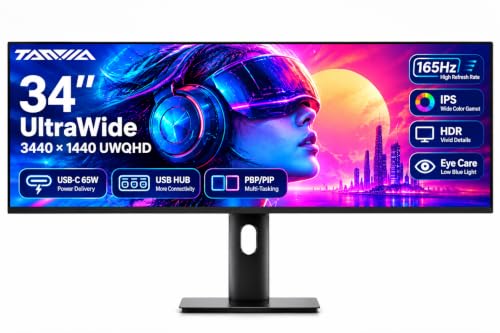
2. TANXJIA 34" Ultrawide Monitor, 3440×1440 UWQHD 165Hz IPS, USB-C KVM
A 3440×1440 resolution delivers sharp visuals across a 34-inch screen. Users who require multiple inputs will find the PBP/PIP split-screen functionality particularly useful for managing tasks efficiently.
Pros:
- 3440×1440 resolution: sharp visuals ideal for gaming and design
- 165Hz refresh rate: smooth motion for fast-paced tasks
- USB-C with 65W power delivery: cleans up desk clutter
- Built-in USB hub: connects multiple devices easily
- KVM switch: control two computers with one setup
Cons:
- Flat screen design may not suit immersive viewing preferences
- 165Hz refresh only via DisplayPort
For users juggling multiple tasks, managing screen space efficiently is critical. The dual-device capability allows users to simultaneously view and control different inputs, thus streamlining workflows.
The 165Hz refresh rate ensures fluid visuals, which is beneficial for both gaming and design work. While the flat screen may lack the immersive feel of a curved display, its expansive viewing area remains effective for multitasking.
3. Samsung 34' Odyssey G5 Ultra-Wide Gaming Monitor
You want an engaging gaming experience that immerses you in the action. A 1000R curved screen aligns with your peripheral vision, enhancing depth and realism during gameplay.
Pros:
- 1000R curvature fills your peripheral vision
- WQHD resolution offers dual-monitor-like experience
- 165Hz refresh rate minimizes motion blur
- AMD FreeSync Premium reduces screen tearing
- HDR10 provides true-to-life color accuracy
Cons:
- Primarily focused on gaming features
- Might not suit professional use as well
The 1000R curvature is key for immersive gaming. It draws you into the experience, making you feel as though you are part of the game, which is especially appealing for long gaming sessions.
Gamers will appreciate the 165Hz refresh rate combined with a 1ms response time. This specification eliminates motion blur, ensuring that fast-paced scenes remain fluid and clear, providing a competitive edge.
4. Sceptre 34-inch Curved Ultrawide WQHD Monitor
Users seeking an expansive monitor for gaming or productivity will find value in this model. The 34-inch curved screen creates an immersive experience, supporting detailed visuals and enhanced multitasking capabilities.
Pros:
- 1ms response time: Reduces ghosting during fast-paced action
- 3440 x 1440 WQHD resolution: Offers detailed and refined pictures
- 21:9 ultrawide aspect ratio: Provides 30% more screen space than standard monitors
- Luminous backcover lights: Adds a modern aesthetic to any setup
- Built-in speakers: Eliminates the need for external audio devices
Cons:
- Limited ergonomic adjustments compared to higher-end models
- No USB-C ports for direct laptop connection
Compared to the LG 34WR55QK-B, the Sceptre monitor features a faster response time of 1ms, making it more suitable for gaming and fast-moving visuals. The ultrawide format and backlighting in the Sceptre model also deliver a distinctive modern look and improved immersion.
The TANXJIA 34" Ultrawide Monitor offers USB-C connectivity, which may appeal to users needing easy connection to modern laptops. However, the Sceptre's superior refresh rate and curved display can enhance gaming and multitasking, making it a strong contender for those focused on performance.
5. INNOCN 40C1R Ultrawide Monitor
The INNOCN 40C1R suits users who need expansive screen real estate, unlike the LG 34WR55QK-B. Its 40-inch size and ultrawide 21:9 aspect ratio provide a wider view, accommodating more applications and enhancing productivity.
Pros:
- 40-inch size expands the visual workspace significantly
- 144Hz refresh rate delivers smoother gaming and viewing
- USB Type-C connectivity allows direct connection to devices
- 95% DCI-P3 coverage offers professional-grade color accuracy
- PBP/PIP technology facilitates efficient multitasking
Cons:
- Size may be overwhelming for smaller desks
- Limited adjustment options compared to some competitors
Users needing to juggle multiple tasks will find the INNOCN 40C1R an excellent choice due to its expansive screen and high refresh rate. The 40-inch ultrawide display allows for immersive gaming and efficient multitasking, helping users view multiple applications side by side without compromising on detail. Features like USB Type-C connectivity simplify device connections, further enhancing productivity.
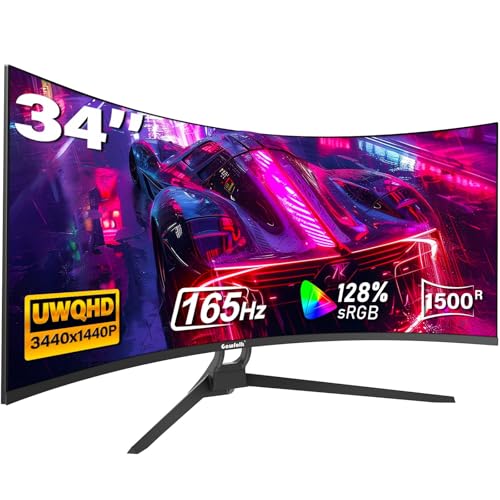
6. Gawfolk 34" Ultrawide Curved Gaming Monitor
Increased screen space allows for better multitasking. A 34-inch display provides ample room for gaming and productivity without compromising on visuals.
Pros:
- 165Hz refresh rate minimizes screen tearing for fluid gameplay
- 3440 x 1440 resolution offers enhanced visual detail
- 1500R curvature immerses users deeper into content
- Multiple ports ensure compatibility with various devices
- 128% sRGB color coverage delivers vivid and rich colors
Cons:
- Curvature may not suit all preferences for flat displays
- Brightness of 300 cd/m² may be lower than some competitors
This monitor is particularly appealing for gamers due to its high refresh rate and wide resolution. A refresh rate of 165Hz is designed to provide fluid motion during fast-paced action, making it suitable for competitive gaming.
The 3440 x 1440 resolution enhances the viewing experience, allowing for better detail in games and productivity tasks. This level of clarity is beneficial for those who need to discern finer details in visuals.
While the 1500R curvature enhances immersion, it may not be preferred by users who are accustomed to flat screens. The brightness rating of 300 cd/m² also indicates that it may not perform as well in brightly lit environments compared to monitors with higher brightness.
7. ASUS TUF Gaming VG34VQL1B 34 Inch Ultrawide Gaming Monitor
This monitor suits gamers who value high refresh rates and sharp visuals. The combination of a curved design and advanced technologies caters to those wanting a competitive edge in fast-paced games.
Pros:
- 34-inch WQHD resolution: Provides expansive visuals for immersive gaming
- 165Hz refresh rate: Supports ultra-smooth gameplay for fast action
- 1ms response time: Reduces ghosting for clearer visuals at high frame rates
- FreeSync Premium technology: Eliminates screen tearing during gameplay
- Ergonomic height adjustable stand: Ensures comfortable viewing during long sessions
- Extensive connectivity: Includes multiple DisplayPort, HDMI, and USB ports
Cons:
- Curved design may not appeal to every user
- May be overkill for casual gamers without high-end PCs
The combination of a 165Hz refresh rate and 1ms response time allows for an incredibly smooth gaming experience. Gamers who prioritize performance will find these features essential for fast-paced gameplay, reducing any lag that might hinder their performance.
While the curved design enhances immersion, it may not suit every preference, especially for those accustomed to flat displays. The extensive connectivity options provide flexibility, making it easier to connect various devices without the need for additional adapters.
8. LG UltraWide Monitor 29U511A – 29” WFHD IPS Display
Those who need to juggle multiple applications will find the 21:9 aspect ratio beneficial. The wide screen is well-suited for video editing and other productivity tasks.
Pros:
- 21:9 WFHD display maximizes workspace for multitasking
- 99% sRGB coverage ensures vibrant and accurate colors
- 100Hz refresh rate provides smoother visuals during use
- Reader Mode and Flicker Safe reduce blue light to lessen eye strain
- Height-adjustable stand creates a cleaner workspace
Cons:
- Limited to WFHD resolution, less detailed than higher resolutions
- Not as curved as some ultrawide models for immersive viewing
The product addresses the need for enhanced multitasking capabilities. A wide screen allows users to view multiple applications side by side, optimizing productivity.
Its 2560 x 1080 resolution, while not as detailed as higher-end options, still offers sufficient clarity for most tasks. The 100Hz refresh rate delivers smoother visuals, which is beneficial for video playback and light gaming.
However, users seeking a more immersive experience may prefer models with a curved design or higher resolutions.
Avoiding Common Mistakes When Choosing Ultrawide Monitors
Choosing the Right Resolution
Resolution affects clarity and detail. Monitors like the LG 34WR55QK-B offer 3440 x 1440 resolution, making it suitable for multitaskers who need clear visuals for work.
Considering Refresh Rates
A higher refresh rate provides smoother visuals. The TANXJIA 34-inch offers up to 165Hz, beneficial for those managing fast-paced tasks or gaming.
Evaluating Screen Size
Screen size impacts how much you can see at once. The INNOCN 40C1R provides a spacious 40-inch screen, ideal for users who need extensive real estate for multiple applications.
Connectivity Options Matter
Multiple ports can enhance versatility. The LG 34WR55QK-B includes 2 HDMI and 1 USB Type-C port, allowing easy connections to various devices.
Understanding Curvature Benefits
Curved monitors can provide a more immersive experience. The Samsung 34' Odyssey G5 features a 1000R curvature, which is especially appealing to gamers for an engaging field of view.
Color Accuracy is Key
Color coverage matters for design work. The TANXJIA monitor covers 100% sRGB, making it suitable for professionals who require accurate colors for their projects.
Frequently Asked Questions
What is the best ultrawide monitor for gaming?
The Samsung 34' Odyssey G5 is the best ultrawide monitor for gaming with its 165Hz refresh rate and 1ms response time.
Are curved ultrawide monitors better than flat?
Curved monitors like the Samsung 34' Odyssey can offer a more immersive viewing experience, which is beneficial for gaming and multitasking.
What is the typical resolution for ultrawide monitors?
Most ultrawide monitors, such as the LG 34WR55QK-B, feature a resolution of 3440 x 1440, providing a clear and detailed display.
Is a higher refresh rate always better?
Yes, a higher refresh rate, like the 165Hz of the TANXJIA monitor, leads to smoother motion, which is particularly advantageous for gaming.
How important is color coverage for productivity?
High color coverage, like 100% sRGB on the TANXJIA monitor, is crucial for tasks that require precise color representation, such as graphic design.
Do ultrawide monitors support multiple devices?
Yes, monitors like the TANXJIA support USB-C KVM functionality, allowing users to switch between dual devices easily.
Which Ultrawide Monitor Should You Choose?
The LG 34WR55QK-B is ideal for multitaskers needing ample screen space, while the TANXJIA 34" is perfect for those managing dual devices. Gamers looking for an immersive experience may prefer the Samsung 34' Odyssey G5. If you only remember one thing, focus on your specific use case to find the best match.