How to Use Time Blocking If You Have ADHD (A System That Actually Works)
Learning how to use time blocking if you have ADHD is one of the most powerful things you can do to take…

Learning how to use time blocking if you have ADHD is one of the most powerful things you can do to take back control of your day.
You’ve probably heard that time blocking is a game-changer for productivity. You’ve maybe even tried it. You color-coded your calendar, scheduled every hour, and felt great for about one day.
Then real life happened. A distraction, a hyperfocus spiral, or just the crushing weight of a perfectly planned schedule that your brain refused to follow. And suddenly the whole system collapsed, and you felt like the problem was you.
Well, let me reassure you, it wasn’t. The standard time blocking advice is designed for neurotypical brains. Your ADHD brain needs a version that’s flexible enough to survive a chaotic Tuesday, forgiving enough for when things go sideways, and engaging enough to actually feel worth doing.
That’s exactly what this guide gives you. A time blocking ADHD system that works with your brain, not against it.
Why This Matters for ADHD
Time blindness is one of the most overlooked ADHD challenges. It’s not that you don’t care about deadlines. It’s that your brain genuinely struggles to sense time passing, estimate how long things take, and transition between tasks.
Standard calendars assume you’ll naturally feel urgency as a deadline approaches. ADHD brains often don’t. The future feels abstract until it’s suddenly right now, and you’re scrambling.
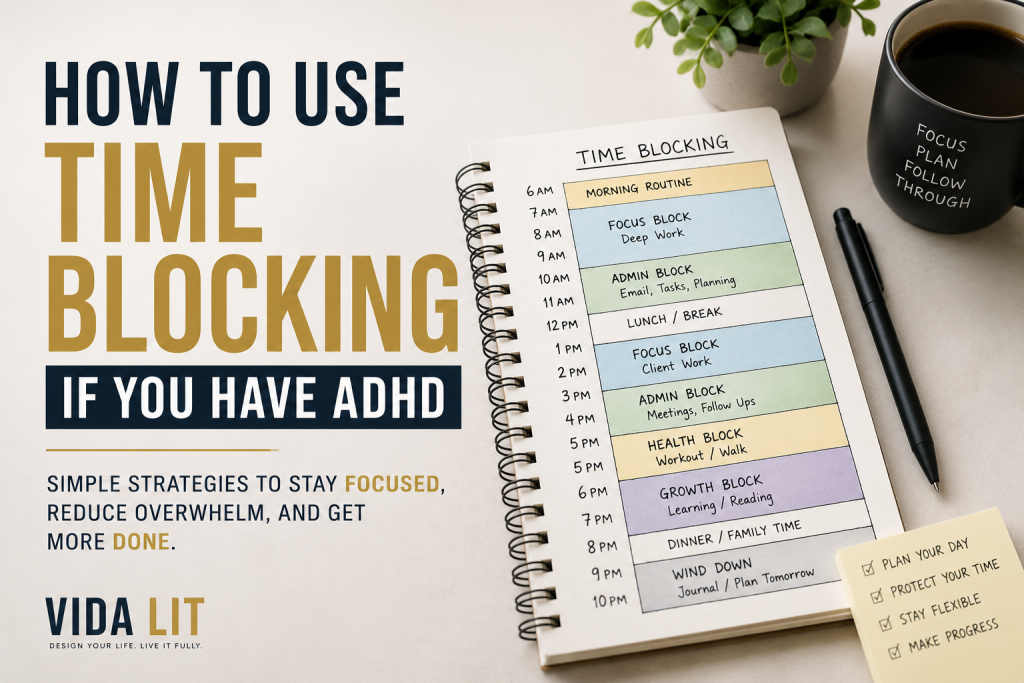
Time blocking works as an ADHD strategy because it makes time visible. Instead of a vague to-do list floating in your head, you assign tasks to a specific home in your day. That structure creates the external cues your brain needs to get started, stay on track, and know when to stop.
But only if you build it the right way.
Step 1: Start With Your Energy Map, Not Your Task List
Before you block a single hour, you need to know when your brain is actually online.
ADHD brains don’t run on a consistent energy level throughout the day. Most people have a peak window, usually 2 to 3 hours, where focus is sharpest. Everything else is in lower gear.
Spend two or three days noticing when you feel sharpest, most creative, or most motivated. A simple habit tracker like Habitica makes this easy and genuinely fun, it turns tracking into a game, which ADHD brains tend to respond to well.

Or keep it analog with a Moleskine Daily Planner and jot your energy level each hour for a few days.
That window where you’re sharpest is sacred. Guard it with your life. Your hardest, most important work goes there. Everything else fills the rest.
Step 2: Use Time Blocks, Not Time Slots
Here’s where most ADHD time blocking attempts fall apart. People schedule 9:00–9:30 for emails, 9:30–10:15 for project work, 10:15–10:45 for a meeting. Then one thing runs long and the whole day collapses like dominoes.
Instead, think in blocks with buffers, not back-to-back slots.
Sunsama is one of the best tools for this, it’s a daily planner that pulls tasks from your other apps and lets you drag them into time blocks with built-in buffer time. It’s built exactly around this kind of intentional, non-rigid scheduling.
Alternatively, Fantastical works beautifully as a calendar app with natural language input, so adding a buffer block takes two seconds.
Create three to four large blocks in your day with 15-minute transition gaps between each. Those gaps aren’t wasted time — for an ADHD brain, they’re essential landing pads between mental modes.
Step 3: Use Time-Aware Tools to Make Blocks Real
A calendar app you ignore is useless. You need tools that make your time blocks visible and audible, especially if you’re prone to time blindness.
The problem with most digital calendars is that they’re designed for people who already feel time naturally. A grid of boxes doesn’t create urgency. It doesn’t tell your brain “this is happening now.” It just sits there, quietly ignored, while you go down a YouTube rabbit hole for 45 minutes.
What you actually need is a tool that makes time feel real, something you glance at and immediately understand where you are in your day, what’s coming next, and how much runway you have left.
Google Calendar is the most accessible starting point and it’s completely free. The key is using it visually, not just as a reminder system. Color-code every block by type, deep work in one color, admin in another, personal in a third. Set audible alerts for 10 minutes before each block ends so your brain gets a warning before the transition hits.
For a more ADHD-friendly experience, Structured was built specifically for the way ADHD brains relate to time. Instead of a static calendar grid, it shows your day as a live timeline that visually empties out as time passes. You can see the blocks ahead of you shrinking in real time, which creates a low-level urgency that a regular calendar never triggers.
Both tools work. The right one is whichever one you’ll actually open every morning.
Step 4: Assign Tasks by Type, Not Just Priority
Not all tasks need the same kind of brain. That’s why dumping everything into “work time” doesn’t work for ADHD.
Sort your tasks into three categories before you block them:
- Deep Focus Tasks — writing, analysis, complex problem solving, creative work
- Admin Tasks — email, scheduling, invoices, short responses
- Maintenance Tasks — filing, organizing, routine check-ins
Todoist is excellent for this, you can create separate projects or labels for each task type and filter your view by category when planning your blocks.

If you prefer something more visual, Trello lets you build a simple three-column board — Deep Focus, Admin, Maintenance — and drag tasks across as you plan your week.
Deep focus tasks go in your peak energy block. Admin tasks go in your low-energy windows. Maintenance tasks can fill gaps or transition periods. This prevents the ADHD trap of spending your sharpest hours on easy busywork because it feels productive.
Step 5: Shrink the Block to Fit the Task (Not the Other Way Around)
ADHD brains are notoriously bad at working for long stretches and notoriously good at working in short, urgent bursts.
Use that. Instead of scheduling 2 hours for a report, schedule three 25-minute focused sprints with 5-minute breaks between them. This is the Pomodoro method, and it fits inside your larger time blocks perfectly.
Forest is an app that gamifies this beautifully. You plant a virtual tree and it grows while you focus. Leave the app and the tree dies. Silly? Maybe. Effective for ADHD brains that need immediate rewards? Absolutely.

For physical timers, the Time Timer PLUS is worth calling out specifically. It’s the upgraded version of the original Time Timer, with a bigger display, a built-in handle, and an optional audible alert you can turn on or off depending on your environment. The visual disk design is the same, but the PLUS is sturdier and easier to move between your desk, kitchen, or wherever you’re working that day.
Step 6: Plan Your Day the Night Before, But Keep It Short
One of the most powerful habits you can build is a 10-minute planning session the night before. Don’t try to plan your whole week at once. Your ADHD brain will get overwhelmed, lose interest halfway through, and then abandon the plan entirely by Wednesday.
Instead, each evening, ask yourself three things:
- What is the one thing that absolutely has to happen tomorrow?
- What are two or three supporting tasks I can realistically fit around it?
- Which of my three block windows will each task live in?
That’s your plan. It fits on a sticky note. And a plan you actually use beats a perfect plan you ignore every single time.

A physical planner like the Panda Planner is great for this because writing by hand activates different memory pathways than typing, which can help things stick better for ADHD brains.
If you would rather keep it digital, Reclaim.ai is worth trying. It automatically schedules your tasks into open blocks on your calendar based on priority and deadline, so even on nights when the planning session feels like too much, your day still has some structure waiting for you in the morning. Think of it as a backup brain for the evenings when your real one is too tired to plan.
Step 7: Build in a Reset Block Every Day
Life with ADHD means something will go off-script. A task takes longer than expected. You hyperfocus and blow past your block. An interruption derails the morning. If you have no buffer, a single disruption ruins your whole system. If you build in a daily Reset Block, you have somewhere to land.

A Reset Block is a 30-minute window, ideally mid-afternoon with nothing planned in it. Use it to reschedule anything that got bumped, clear your head, or just breathe. If your nervous system needs a real reset, Headspace has short 5 to 10 minute guided sessions designed for exactly this kind of mid-day mental recharge.

For people who reset better through movement or tactile stimulation, a Flippy Chain Fidget Toy sounds ridiculous but genuinely helps quiet the mental noise between blocks.
This single habit is the difference between a time blocking system that lasts a week and one that sticks long-term.
Step 8: Review and Adjust Every Week
Your time blocking ADHD system isn’t a finished product the first time you build it. It’s a prototype you keep improving.
Set aside 15 minutes every Sunday — or Monday morning — to do a quick review:
- Which blocks worked well?
- Where did things fall apart?
- Did you over-schedule and run out of steam?
- Were the blocks too long? Too short?
Adjust one thing at a time. Small tweaks compound into a system that genuinely fits your life.
Notion is great for this kind of structured reflection — you can build a simple weekly review template you reuse every Sunday, with your questions already there waiting for you.

If digital tools feel like too much friction for a Sunday evening, a Five Minute Journal has a built-in weekly reflection format that keeps the process short, tactile, and low-pressure.
The goal of the weekly review isn’t to judge how well you followed the plan. It’s to make next week’s plan smarter than this week’s. That distinction matters, especially for ADHD brains that are already carrying enough self-criticism around.
Step 9: Give Yourself Permission to Have a “Wild Card” Block
Here’s something most productivity advice never says: schedule one block per day with no plan at all. Call it a Wild Card Block. It exists for the task your brain randomly becomes obsessed with, the project that suddenly feels urgent, the creative idea you don’t want to lose, the rabbit hole that calls your name.
The key is capturing those ideas before they hijack everything else.
Obsidian is a powerful note-taking app that lets you dump ideas quickly and link them together later, great for ADHD brains that make unusual connections.

If you prefer pen and paper, keep a Leuchtturm1917 Bullet Journal on your desk as a dedicated idea dump. When a random thought hijacks your attention, you write it there and it waits for the Wild Card Block instead of stealing from everything else.
ADHD brains are often most productive when they’re following genuine interest. A Wild Card Block lets that happen on purpose.
Common Mistakes to Avoid
1. Over-scheduling every minute. If your calendar looks like a game of Tetris with no gaps, it will collapse the second anything goes wrong. White space in your schedule isn’t wasted time, it’s a cushion your ADHD brain desperately needs.
2. Planning based on who you wish you were. Don’t schedule 6 AM deep work if you’ve never once felt functional before 9. Build your system around your real patterns, not your aspirational ones.
3. Using too many tools at once. One planner. One timer. One calendar. That’s it. Every tool you add is another thing to manage, and too many systems guarantee you’ll follow none of them.
4. Treating every missed block as a failure. Missing a block isn’t failure. It’s data. Ask what got in the way, adjust, and keep going. Perfectionism is one of the biggest ADHD productivity killers there is.
5. Skipping the transition gaps. They feel optional. They’re not. Without them, your brain never fully shifts modes, and you end up half-distracted in every block.
FAQ
Q: Is time blocking realistic for someone with severe ADHD? A: Yes — but the key is building a loose version first. Start with just two or three labeled blocks per day instead of a full schedule. Add more structure only once the basics feel natural.
Q: What’s the best app for time blocking with ADHD? A: Structured is specifically designed for visual time blocking and gets consistent praise from ADHD users. Google Calendar works well too if you use color-coding and set alerts. The right app is whichever one you’ll actually open.
Q: How long should my time blocks be? A: For ADHD, shorter is usually better. Try 25 to 45 minutes for focused work blocks with at least a 5 to 10 minute break between them. Experiment and adjust — your brain’s ideal block length is personal.
Q: What if I hyperfocus and blow past a block? A: This is normal. Set an audible alarm at the end of every block — not just a visual one. A sound that interrupts you is much harder to ignore when you’re deep in a hyperfocus spiral.
Q: Should I time block weekends too? A: Light blocking — just one or two anchors like a workout or a creative project — can help ADHD brains avoid the weekend abyss of unstructured time. But keep it minimal. Rest is part of the system too.
Final Thoughts
A time blocking ADHD system works when it’s built around your real brain, with flexibility, transitions, visual tools, and room for the unexpected. You don’t need to be perfect. You need a system that survives imperfection and keeps moving anyway.
Start with just two blocks tomorrow. Label them. Set timers. See how it feels. Build from there. The goal isn’t a flawless calendar. It’s a day where you actually got the important stuff done and didn’t hate yourself in the process. That’s worth building toward.
And you don’t have to figure it out alone. Everything on Vidalit is written for the way your brain actually works, not the way productivity gurus think it should. Whether you’re just starting to build structure or you’re refining a system that’s mostly working, there’s something here for where you are right now. Keep exploring, keep adjusting, and trust that the right system for you is closer than it feels.
Ready to try it? Pick one tool from this guide — a visual timer, a planner, or a block-based app — and use it for one day. Just one. Then come back to vidalit.com for more strategies built specifically for the ADHD brain.